

Image Generation
AI-powered image creation in your chat app
Overview
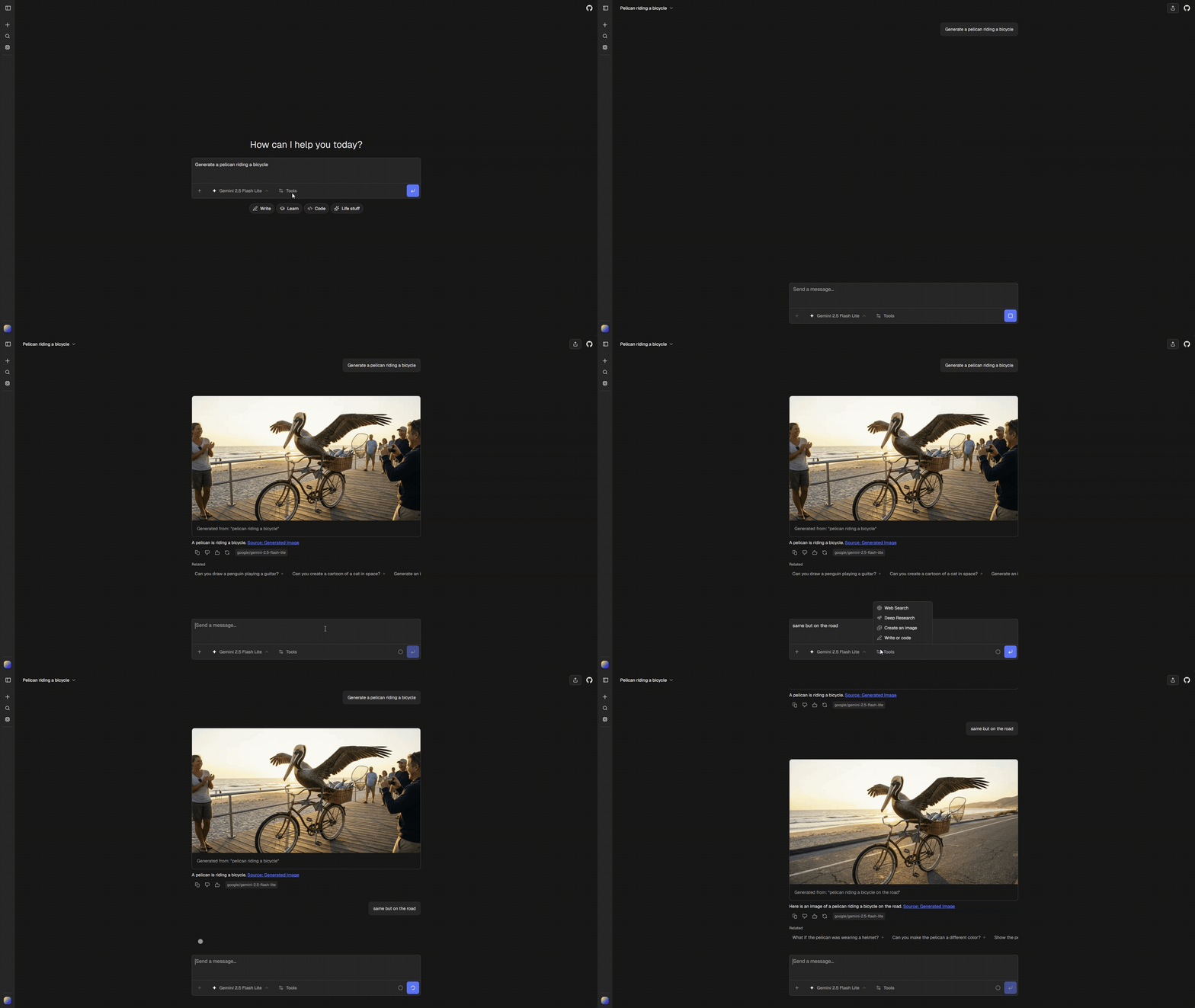
Generate images directly in chat using AI models. Supports both generation from text prompts and iterative editing of existing images.
Quick Start
Install the image tool, then enable it in chat.config.ts:
ai: {
  tools: {
    image: {
      enabled: true, // Requires durable file storage
    },
  },
}Configure the default image model:
ai: {
  tools: {
    image: {
      default: "google/gemini-3-pro-image",
    },
  },
}
Modes
The tool operates in two modes based on context:
| Mode | Trigger | Behavior |
|---|---|---|
generate |
Text prompt only | Creates new image from scratch |
edit |
Prompt + attachments or previous generation | Uses existing images as input |
Mode is determined automatically:
const mode = imageParts.length > 0 || lastGeneratedImage ? "edit" : "generate";Iterative Editing
Users can iterate on generated images without re-uploading. The system automatically tracks the last generated image in the conversation.
How It Works
- The chat agent scans the latest assistant message for a successful image result.
- It supplies
lastGeneratedImage, attachments, the selected model, and the cost accumulator through the AI SDK tool execution context. - The installed tool uses those images as input when editing.
The previous-image helper recognizes the built-in { imageUrl, prompt } result. External tools may use different schemas. Unrecognized results are ignored rather than treated as an image.
User Experience
- User: “Generate a sunset over mountains”
- AI: generates image
- User: “Add a lake in the foreground”
- AI: edits previous image (no re-upload needed)
Image Sources
Edit mode combines images from multiple sources:
| Source | Description |
|---|---|
lastGeneratedImage |
Most recent generated image in conversation |
attachments |
User-uploaded images in current message |
Both are fetched and passed to the model:
async function collectEditImages({ imageParts, lastGeneratedImage }) {
  return await Promise.all([
    ...(lastGeneratedImage
      ? [fetchImageBuffer(lastGeneratedImage.imageUrl)]
      : []),
    ...imageParts.map((p) => fetchImageBuffer(p.url)),
  ]);
}
Architecture
Follows the Tool Part pattern:
tools/chatjs/generate-image/tool.ts → tools/chatjs/generate-image/renderer.tsxTool Output
return { imageUrl: result.url, prompt };The generated image is uploaded through the configured Files SDK provider and the ChatJS file URL is returned.
UI States
| State | Shows |
|---|---|
input-available |
Skeleton + Generating image: {prompt} |
output-available |
Image + copy button + prompt |
Configuration
Image Model
ai: {
  tools: {
    image: {
      default: "google/gemini-3-pro-image",
    },
  },
}
Model Selection Logic
The tool supports two types of models:
| Type | Description | Example |
|---|---|---|
| Image model | Standalone image generation models | google/gemini-3-pro-image |
| Multimodal | Language models with image generation capability | google/gemini-2.0-flash-exp |
Model selection is done in resolveImageModel(selectedModel) in tools/chatjs/generate-image/tool.ts:
- If the user’s selected chat model supports image output (per app model registry,
model.output.image), use it - Otherwise, fall back to
config.ai.tools.image.default
Image Model vs Multimodal Generation
The tool uses different generation paths based on model type:
Image model (generateImage from AI SDK):
- Uses standalone image models via
getImageModel() - Supports edit mode with image buffers as input
- Returns base64-encoded images
Multimodal (generateText with image output):
- Uses language models via
getMultimodalImageModel() - Passes images as URL references in message content
- Requires
responseModalities: ["TEXT", "IMAGE"]for Google models - Extracts generated image from response files