

Web Search
Real-time web search with citations
Overview
Enable your AI to search the web in real-time and provide answers with inline citations. The tool supports multiple queries per request for comprehensive research.
Quick Start
Enable web search in chat.config.ts:
ai: {
  tools: {
    webSearch: {
      enabled: true, // Requires the selected search tool’s credentials
    },
  },
}
Environment Variables
Select a search tool when creating the app:
bunx @chat-js/cli create my-app --search-tool tavily-search
# Or: --search-tool firecrawl-search
Set TAVILY_API_KEY for Tavily or FIRECRAWL_API_KEY for Firecrawl in .env.local. The selected tool is used by both chat and deep research. Keys do not select the implementation automatically.
Providers
| Provider | Best For | Features |
|---|---|---|
| Tavily | General search | Topic filtering, news mode, domain exclusions |
| Firecrawl | Content extraction | High-quality markdown from web pages |
Tavily
Default provider with search-specific optimizations:
- Topics:
generalornews(news limits to last 7 days) - Search depth:
basicoradvanced - Domain filtering: Exclude specific domains from results
Firecrawl
Alternative provider focused on content quality. Returns clean markdown extracted from pages.
Features
Multi-Query Search
The tool accepts up to 2 queries per request, executed in parallel:
{
  search_queries: [
    { query: "latest AI developments 2024", maxResults: 5 },
    { query: "machine learning trends", maxResults: 5 },
  ];
}
Results are automatically deduplicated by domain and URL.
Inline Citations
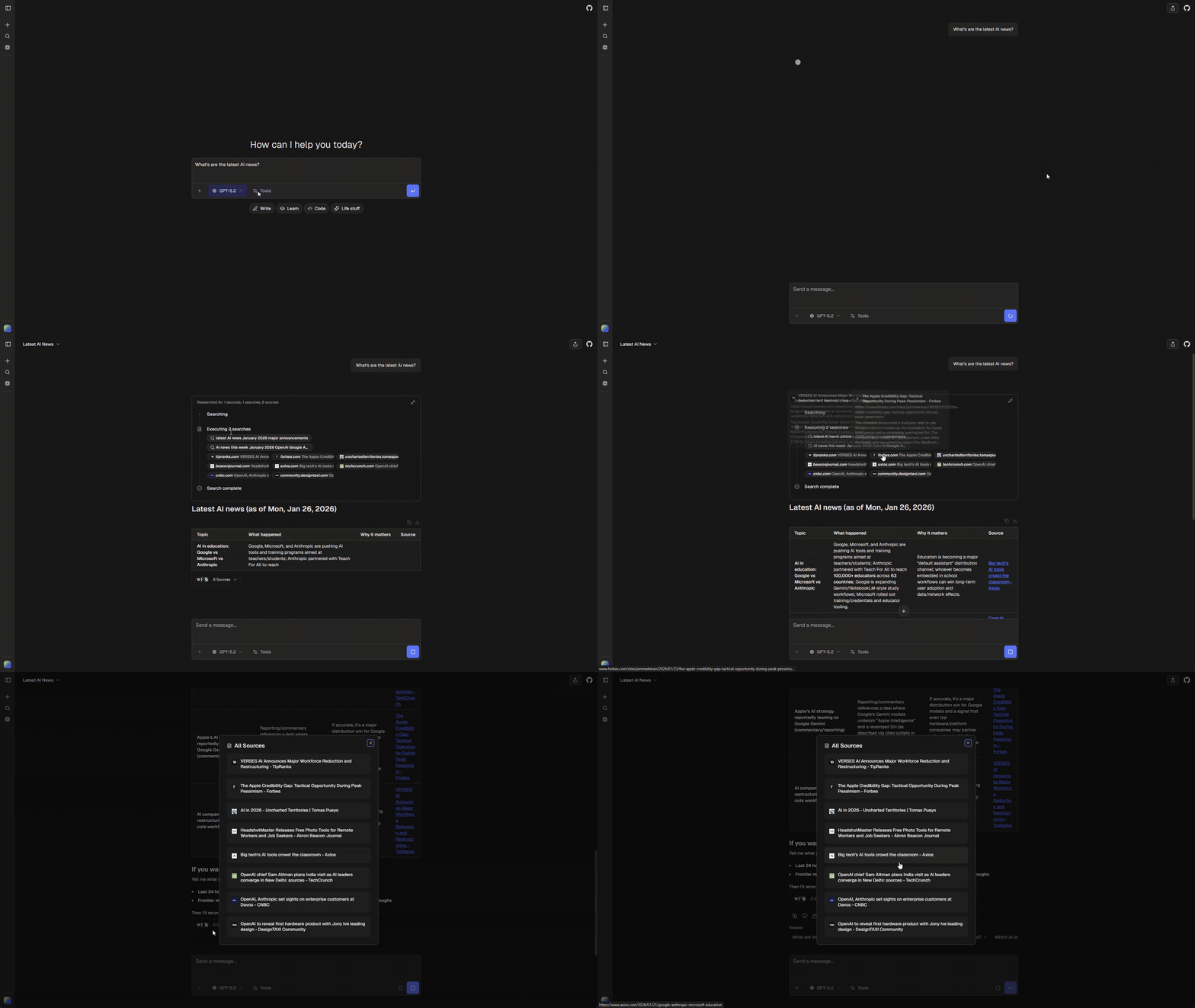
Search results are displayed as collapsible source cards. The AI is instructed to cite sources inline when using retrieved information.
Progress Indicators
While searching, the UI shows:
- Search status (running/completed)
- Query text being executed
- Number of sources found
Tool Output
Returns search results grouped by query:
{
  searches: [
    {
      query: { query: "...", maxResults: 5 },
      results: [{ url: "...", title: "...", content: "..." }],
    },
  ];
}
UI States
| State | Shows |
|---|---|
input-available |
Progress indicator with query |
output-available |
Collapsible source cards with titles and URLs |
Customization
Tool Definition
The selected implementation lives in tools/chatjs/<id>/tool.ts. Edit its typed schema, description, and execution options there. Shared progress and source card events are handled by tools/platform/search-presentation.ts.
Change the selected tool
Keep any custom edits, then remove the previous search tool directory (for example, tools/chatjs/tavily-search) and install the replacement:
bunx @chat-js/cli add firecrawl-searchSync requires exactly one installed search selection when search is used. It generates the registration indexes in tools/chatjs/tools.ts and ui.ts, plus search-config.ts for credentials. Do not edit generated files. An unused native package can be removed after checking that no other tool uses it. Firecrawl may also be needed by URL retrieval.
URL Retrieval
A separate retrieveUrl tool is available for fetching structured content from specific URLs (as opposed to searching the web). This tool uses Firecrawl to extract clean markdown from any webpage.
Enable in chat.config.ts:
ai: {
  tools: {
    urlRetrieval: {
      enabled: true, // Requires FIRECRAWL_API_KEY
    },
  },
}
The tool extracts:
- Page title and description
- Clean markdown content
- Source URL and language metadata
Use web search for discovery and URL retrieval for extracting content from known URLs.
External search tools
Pass an external registry item URL to --search-tool. The item exports a standard AI SDK tool and declares slot: "webSearch". It owns its schema, output, credentials, and optional renderer. The multi-query schema and progress cards above describe the built-in items, not requirements for external search tools.
Chat and deep research both expose the selected tool to their models. See Authoring tools for metadata and renderer registration.